
Principal Planner · Mac and Windows
 Principal Planner · Mac and Windows
Know which week it is, and what it needs.
A planning app for school leaders: principals, deputies, heads of department and anyone who plans a school’s year. Add your school events and Principal Planner works backwards from each date, breaking down what needs to happen in the weeks beforehand, so you know what needs doing now, not just what is coming later.
Built in for Queensland state schools. Two‑minute setup for every other Australian school.
The free version is yours to keep. $49 once unlocks everything, in place.
Week 3, Term 4
19–25 October 2026
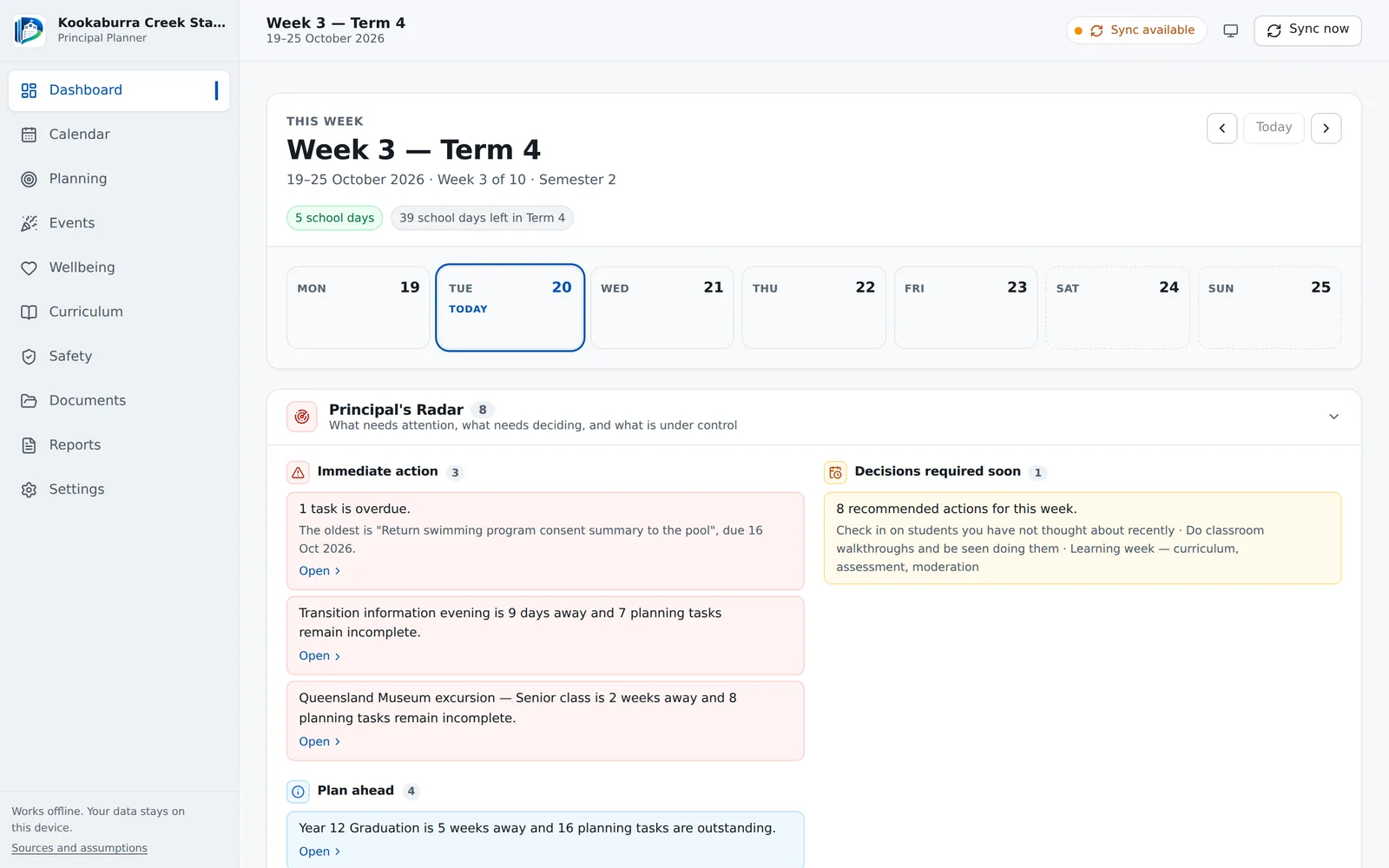
The dashboard on a Tuesday morning. The school, staff and events are an invented example; the term dates are the real Queensland state school dates.
Why it helps
The term does not wait for you to remember it.
Graduation needs its venue booked in August. The excursion needs its risk assessment before the consent forms go home. Most of a principal's planning is knowing what has to start now for something that happens later. Principal Planner keeps that arithmetic for you.
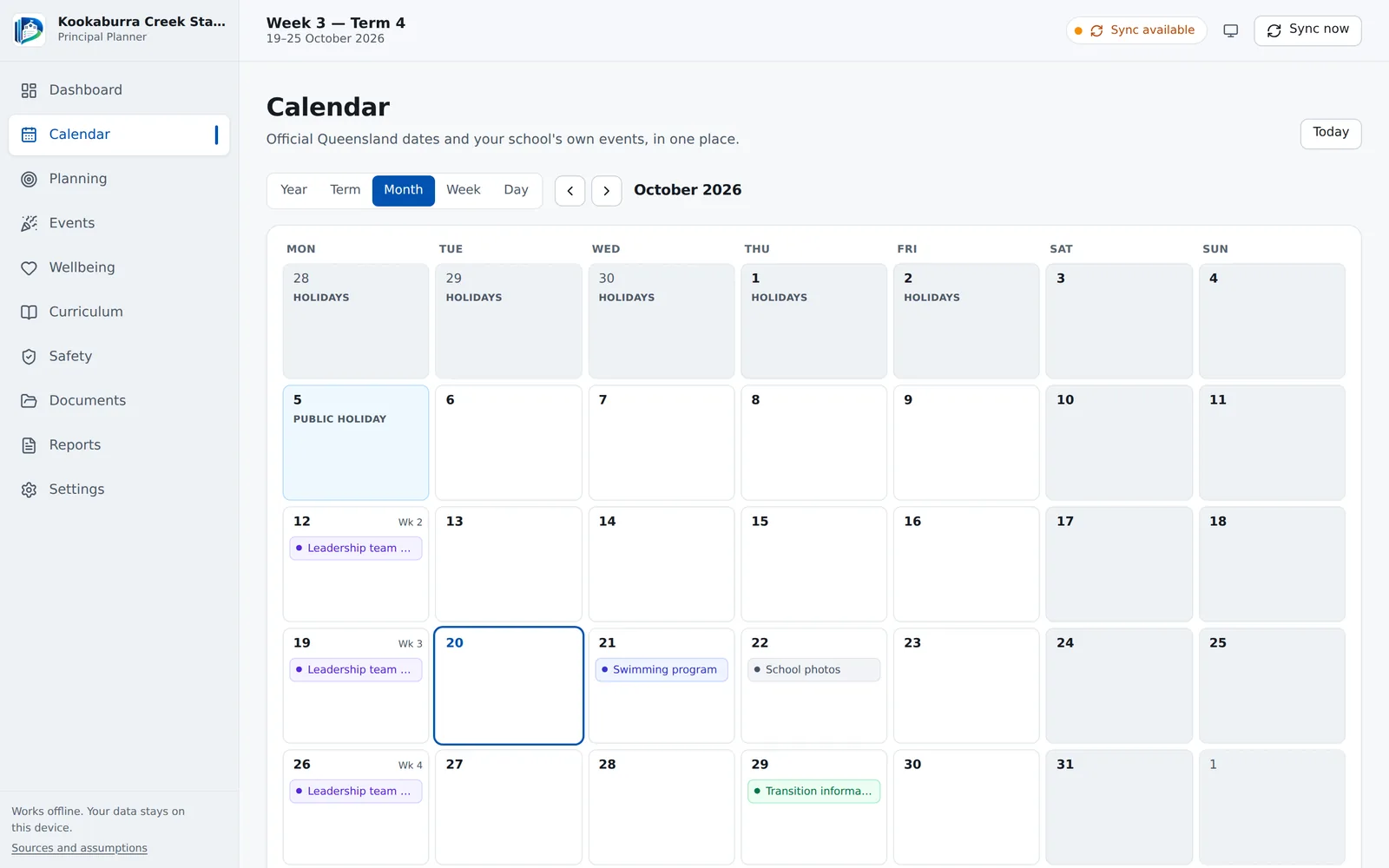
Your calendar, set once
Queensland state schools start with term dates, holidays and public holidays built in. Every other school, in any state, Catholic or independent, enters its four terms in about two minutes; holidays and national public holidays follow. The week of the term is then on every screen.
Plans that work back from the date
Choose a template for an event and every task gets a due date, worked back from the event itself and never landing in the holidays. Move the event and its checklist moves with it.
It stays on your computer
No account, no cloud, no server. Nothing about you or your school is ever sent. Queensland state schools can press Sync now to check for official calendar changes; that is the only time it goes online.
How it works
Set up once. Then open it on a Monday.
Tell it about your school
A short setup asks for your school, your leadership team and the support areas you work with. The support areas decide which prompts you see, so a school without senior students is not asked about senior pathways.
Then set your calendar. Queensland state schools already have their term dates; every other school enters its four terms. Add anything local, such as a show holiday or student-free days.
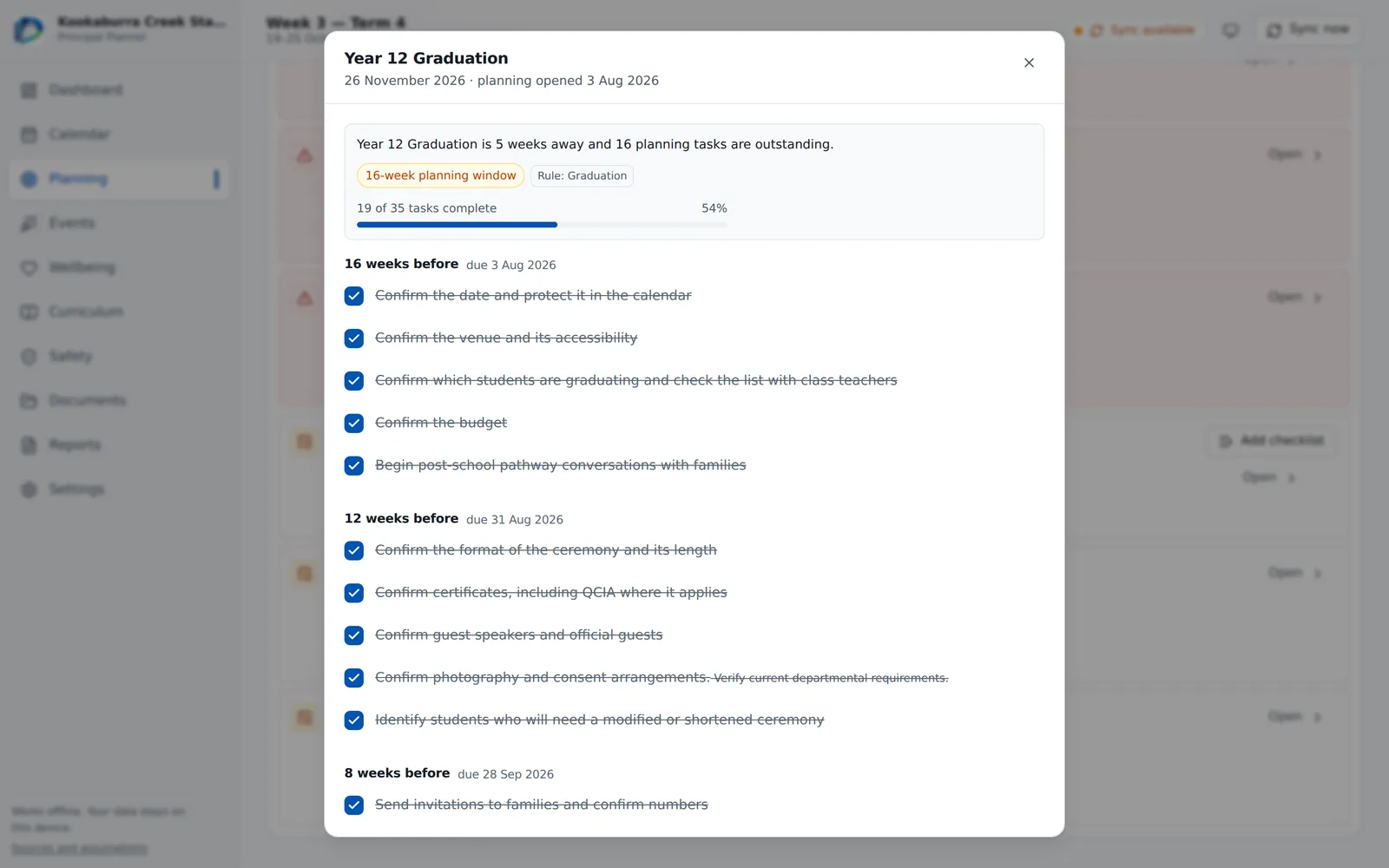
Plan an event from a template
Graduation, camp, an excursion, a concert, the start and end of the year: pick one, give it a date, and you have a full checklist in stages, each dated back from the event.
Tick things off as they are done, add your own, hand some to a deputy. Plan something late and it tells you which stages are already due, rather than pretending there is time.
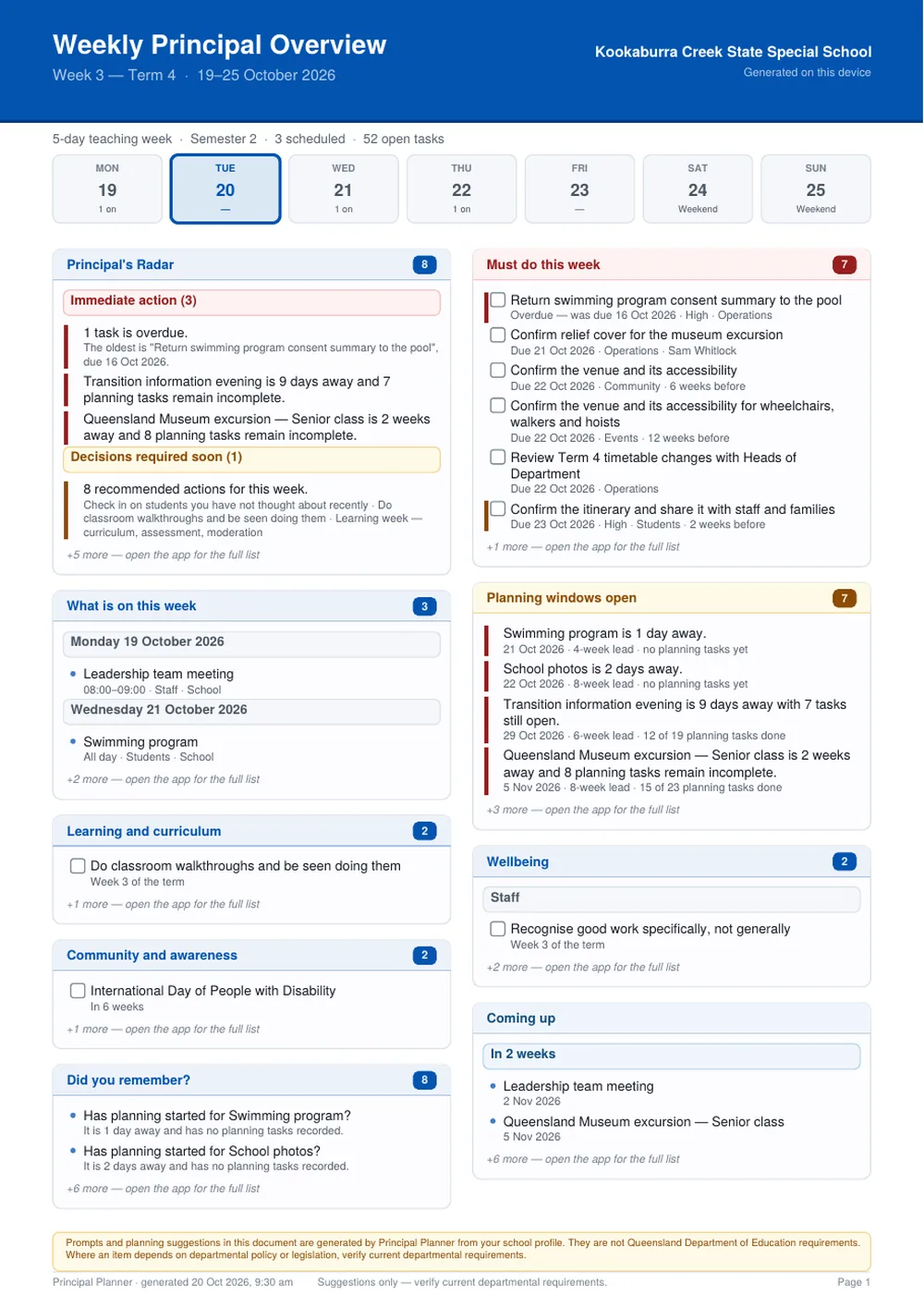
Print the week
The Weekly Principal Overview puts the week on one page: what needs action, what needs deciding, which plans are behind, and what is on each day. Print it for Monday's leadership meeting, or keep it as a PDF.
Anything that depends on departmental policy says so, in the item itself: Verify current departmental requirements.
What it is, and what it is not
Suggestions from a planner, not rules from your department.
Principal Planner is an independent product. It is not made, endorsed or checked by the Queensland Department of Education or any other education department or school system, and it is careful never to talk as if it were.
Every date shows where it came from
For Queensland state schools, term dates and holidays come from the Department’s published school calendar. Everywhere else, they are the dates your school entered. The app shows where each date came from, and what your school changed.
Everything else is a suggestion
Lead times, checklists and prompts are the app's own ideas about good practice. They are a starting point for your judgement, not a statement of what you must do.
Policy questions point you to the source
Where something depends on departmental policy or legislation, the item carries Verify current departmental requirements, so the reminder travels with the task, onto paper too.
A page that shows its working
Sources and assumptions, at the bottom of every screen, sets out what is official, what came from your school, and what the app generated.
Free and licensed
The free version runs this week. A licence adds the ones ahead.
Download it and use it for as long as you like. A licence key unlocks the rest in place: nothing you entered changes, and nothing is ever taken away if a licence is removed.
Free
- Your school calendar and week numbers: built in for Queensland state schools, your own term dates anywhere else
- Your school’s own changes, student-free days and local holidays
- Events, tasks and a weekly view of both, with a note of anything else on the same day
- Three complete planning templates: excursion, concert and information evening
- Weekly rhythm and safety prompts
- A printable weekly checklist
- Up to ten documents kept on your computer
- Backup and restore, always
With a licence
- Every event template: graduation, camp, Year 12 transition, sports day, the start and end of the year, and more
- Principal’s Radar: what needs action now, what needs deciding soon, what is coming
- The full prompt library: wellbeing, curriculum, community and awareness, in the right week of each term
- Term and year checklists, ready when you need them
- The Weekly Principal Overview as a printable page
- Unlimited documents, attached to the events that need them
- Your school’s logo and colours, picked from the logo, in the app and on every printout
- Your own lead times and every “Did you remember?” question
Price
One payment. Yours to keep.
Buy once and use it for as long as you like. Try the free version first if you would rather see how it fits your school before paying anything.
$49
AUD · once · one person
- Mac and Windows, both included
- Use it on the computers you use, at school and at home
- Everything unlocked: every template, the Radar and the weekly overview
- Yours to keep, with no expiry
Ready when you are.
Not ready? Download the free version. A key added later unlocks it in place.
Secure checkout by Stripe. Your licence key is emailed to you automatically, usually within a few minutes of paying.
For the leadership team
School licence
One key for the principal and the school’s leadership team, each on their own computer. Purchase orders welcome. Email for a price:
hello@designedlearningco.au
The details
What you are installing
- Runs on
- macOS 13 Ventura or newer (Apple Silicon and Intel) · Windows 10 and 11, 64-bit
- Internet
- Not needed to install, run or license. Used only when a Queensland state school presses Sync now.
- Where your data lives
- On your computer, in the app’s own folder. Nothing is uploaded.
- Backups
- One file with everything in it, to keep somewhere safe or move to a new computer
- Printing
- A weekly checklist, and with a licence the Weekly Principal Overview, as PDFs ready to print
- For your ICT team or business manager
- One-page fact sheet (PDF): what it installs, what it connects to and where information is kept.
- Download size
- About 130 MB. Installs from a USB stick as happily as from a download.
Questions
Before you buy
Is this a Department of Education product?
No. Principal Planner is made by Designed Learning Co., an independent Australian business. It is not made, endorsed or checked by the Queensland Department of Education or any other education department or school system.
For Queensland state schools it uses the Department's published school calendar for term dates and holidays, and says so. Every other school enters its own dates. Its planning suggestions are its own, and anything touching departmental policy tells you to verify the current requirements.
Does it need the internet?
No. It installs, runs and accepts a licence key with no connection at all. The only time it goes online is when a Queensland state school presses Sync now, which downloads the Department's public school calendar to check for changes. Nothing about you or your school is sent.
If your network blocks that, you can download the calendar file yourself and import it instead. Schools that enter their own term dates never need the internet at all.
Where is my information kept?
On your own computer, in the app's own folder. There is no server and no account, so there is nothing of yours for us to see. That also means the backups are yours to make: Settings → Data → Export local backup gives you one file with everything in it.
For your ICT team or business manager there is a one-page fact sheet (PDF) with the technical detail.
Can the leadership team share one planner?
Not live. Each person's planner lives on their own computer, and nothing syncs between them. A backup file can move a whole planner from one computer to another, and the printed weekly overview is an easy way to put the week in front of everyone.
Who is it for?
Anyone who plans a school’s year: principals, deputies, heads of department, business managers, and teachers who run the big events. The weekly overview is written for a leader’s Monday, but the calendar, the event plans and the checklists work the same for anyone.
It works in every Australian state and territory. Queensland state schools get the state calendar built in. Every other school, including Catholic and independent schools, picks its state and enters its own four terms; public holidays and school holidays are worked out from there, and each October it reminds you to add next year’s dates.
It was first written for special schools, so some prompts cover support areas such as personal care, communication and senior pathways. You choose which apply during setup, and a mainstream school simply leaves them out. Try the free version and see how it fits.
How many computers can I install it on?
A single licence covers the computers you personally use, such as a laptop at school and one at home. For a whole leadership team, a school licence is the right thing: email hello@designedlearningco.au.
Who makes it?
Designed Learning Co., a small independent Australian studio run by a practising Australian teacher who works in a special school. It also makes Wordwave, a reading-video tool for classrooms.
Start with next term’s biggest event.
Download the free version, plan one real event, and see what it tells you. Buy once for $49 when it has earned its place. Every email is read by the person who built it.