
Wordwave · Mac and Windows
Every word lights up the moment it is read.
Turn a song, a story or your own voice into a word-by-word reading video. Tap along once, or record yourself reading and tap as you go. Wordwave does the rest.
The whole app. Words on the left, your video in the middle, the audio underneath with every word pinned to the sound it belongs to.
Why it works
Reading along is easier when the page keeps up with the voice.
When students read along with an audio track, they have to follow both the words and the voice. Wordwave connects the two by highlighting each word as it is read, making it easier for students to stay on track and focus on the reading itself.
Word by word, not line by line
Most captions give a whole line at a time. Wordwave marks every single word, so a reader always knows exactly where the voice is, even mid-sentence.
Your voice, your text, your pace
Use a song, a picture book read aloud, or your own reading of a decodable passage, recorded right in the app. Slow the audio down while you tap if you need to; the export stays at full speed.
It stays on your computer
No account, no cloud, no upload. Wordwave never asks for the internet, which is the shortest possible answer when a school asks where the data went.
How it works
Three steps. About ten minutes for a song.
Paste your words in
Type them, or paste them from anywhere. Wordwave splits them into lines and words for you, and keeps your line breaks where a song needs them.
Then bring in the audio: an MP3 from your music library, an M4A off your phone, or a voice memo. Or skip the file altogether and record yourself reading it, straight into Wordwave, with any microphone your computer has.
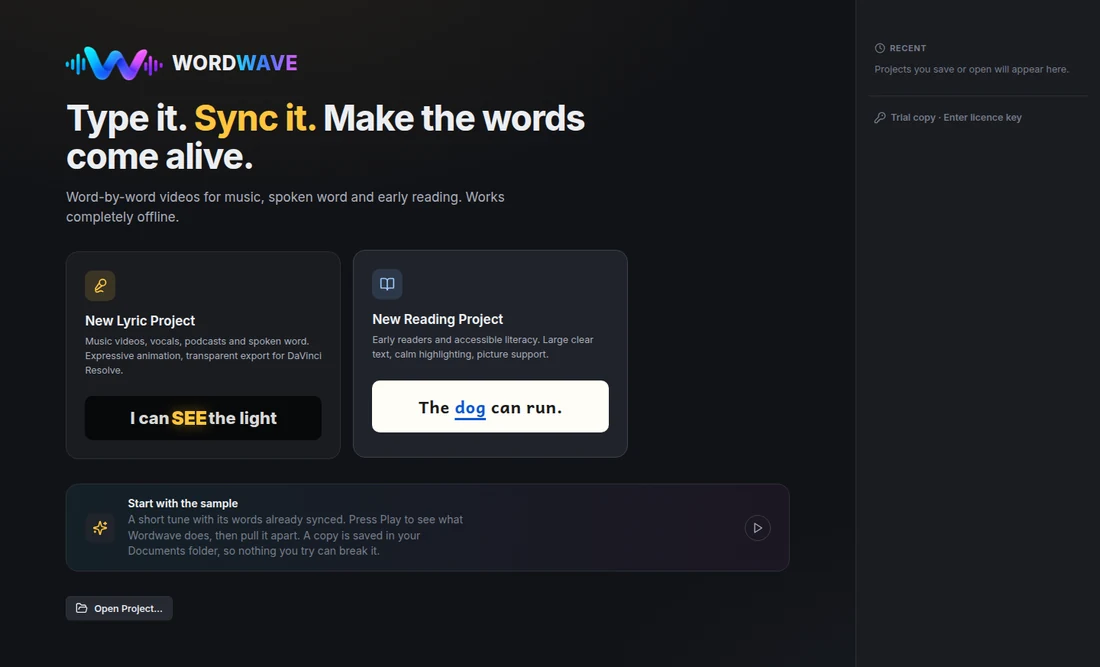
Tap the space bar as you listen
Press play and tap once on each word as you hear it. That is the whole of the timing. No dragging markers around a timeline, no typing numbers.
Recording your own voice? Tap each word as you read it aloud, and the timing is finished when you stop. Pause whenever you need to, listen back before you keep it, and if one sentence comes out wrong, record just that sentence again. The rest stays exactly in time.
Everyone taps a fraction late, so a quick calibration measures how late you tap, and Wordwave takes exactly that off every tap, then nudges each one onto the instant the sound starts. Miss one and keep going; you can step back a word, skip a line, or redo a verse on its own.
Or let Wordwave do it: with the full version, Auto-time listens to the recording and places every word for you, on your own computer. It is best with clear speech such as a reading; with singing over music, treat it as a first pass and tap any line that needs it.
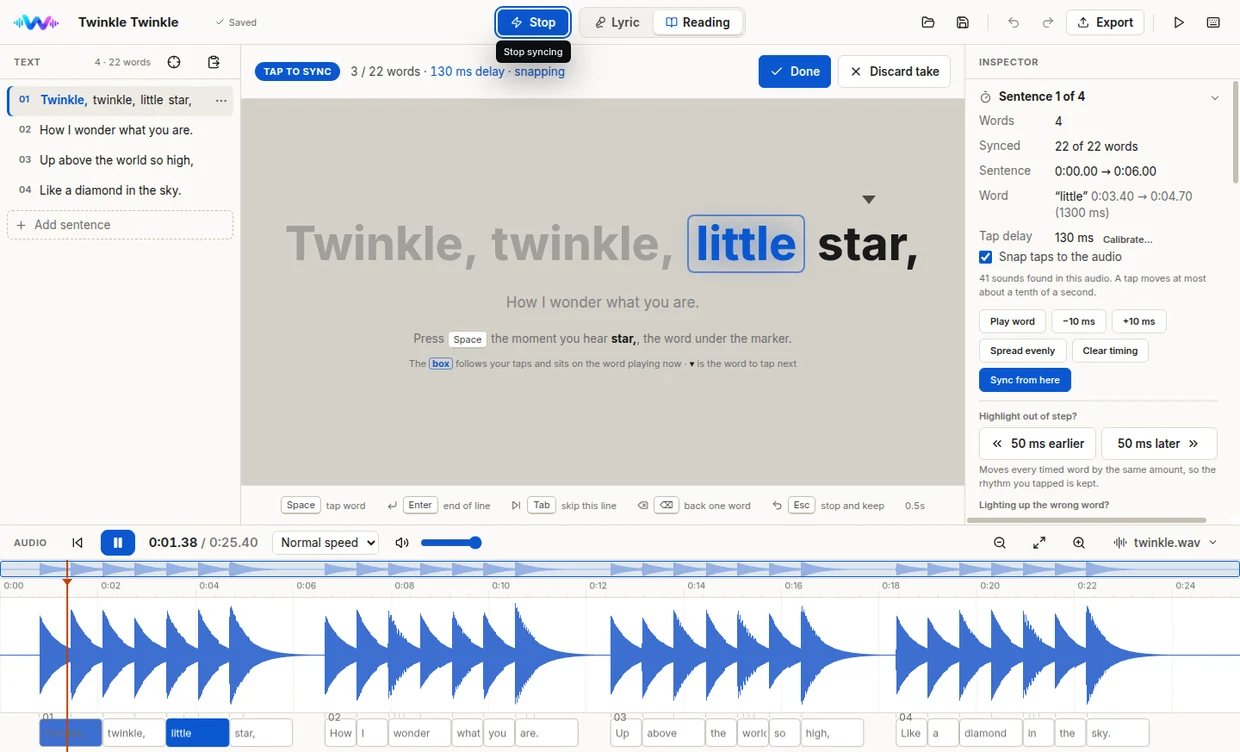
Export the video
An MP4 for the whiteboard, your school drive or a class blog. Or, if you edit video, a ProRes or QuickTime file with a transparent background that drops straight onto a track in DaVinci Resolve or Premiere.
Subtitles too, as SRT or WebVTT, if you would rather hand the timings to something else.
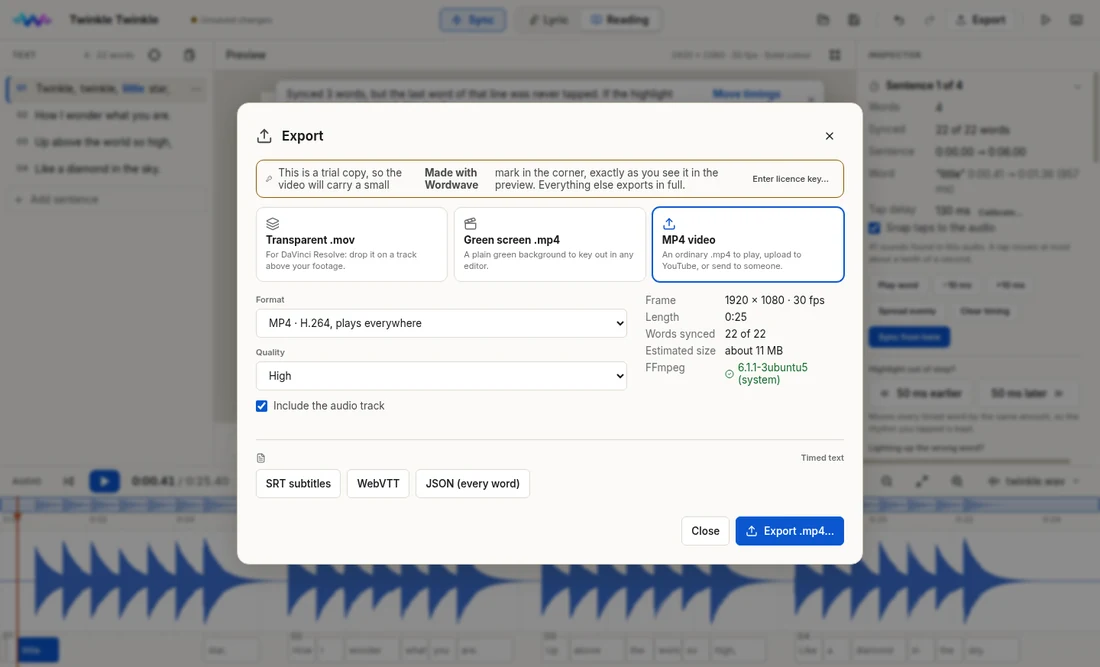
New · Guide me
Never made a video? Wordwave walks you through it.
Press Guide me on the welcome screen and Wordwave takes you through a whole story, one small step at a time, pointing at the exact button for each one. It suits a first-time teacher, and it suits a student making their own.
Write a sentence, then read it aloud
Type one sentence. Record it, tapping each word as you say it. Watch it play back and nudge any word that is early or late.
Add a picture, then the next sentence
Choose a picture to show with that sentence, move it and size it on the preview, then carry on with the next one. A story is built a sentence at a time.
Check it, then make the video
A last look shows any sentence that still needs recording, with a button to fix it. Then one click makes the MP4. Close the guide at any point and it picks up where you left off.
What teachers make with it
One tool, many uses.
Shared reading
Put a text on the board the whole class can follow at once, at a pace you set.
Decodable practice
Record yourself reading a decodable passage, right in Wordwave, and let students track every word as you say it.
Sight words in songs
The words students already sing are words they will read. Make the connection visible.
EAL/D and new readers
Hearing and seeing a word at the same moment is the whole point, and it is what this does.
Assembly and performance
Lyrics on the screen that actually keep time with the backing track.
Home practice
Send the video home so a student can practise with the same voice they heard in class.
Social stories
Write a short social story, read it in your own voice and show a picture with each sentence.
Students as authors
With Guide me, a student can write a sentence, read it aloud, add a picture and make the video, one step at a time.
Built for a school laptop
Written by a teacher who has read a few ICT policies.
Wordwave was built in an Australian classroom, for a senior secondary group, on the kind of laptop a school actually issues. The awkward parts of school software were designed out on purpose.
It never connects to anything
There is no server, no sign-in and no telemetry. Students' names, voices and recordings stay on the machine they were made on. The microphone is only switched on when someone presses Record.
No account, no seat to manage
A licence key unlocks the copy on your computer and is checked on that computer. Nothing to administer, nothing to renew, no password to forget.
Your projects are ordinary folders
Every project is a folder you can see, copy onto a USB stick, put in a school drive or hand to a colleague. Nothing is locked in a format only Wordwave can open.
Buy it once, keep it
One payment for the version you buy, and it keeps working. No annual licence to justify to a business manager every August.
Also
It makes lyric videos too.
Wordwave has a second mode built for music: expressive word animation, custom type and colour, and export with a transparent background so the words sit over your own footage.
If you run a choir, a music class or a YouTube channel, it is the same tap-along workflow with the styling turned up.
Price
One payment. Yours to keep.
Buy once and use it for as long as you like. Try it free first: the trial exports real video, so you can find out whether it suits your classroom before paying anything.
$49
AUD · once · not a subscription
- Mac and Windows, both included
- Use it on your own computers, home and work
- Unlimited videos, no watermark, no export limit
- Auto-time: every word timed for you from the recording
- Yours to keep, with no expiry
Ready when you are.
Not ready? Download the free trial. It exports real video, with a small corner mark.
Secure checkout by Stripe. Your licence key is emailed to you automatically, usually within a few minutes of paying.
Hear about what comes next
One email when a new program is ready. Nothing else, ever.
Schools needing several copies: ask about a site licence.
The details
What you are installing
- Runs on
- macOS 13 Ventura or newer (Apple Silicon and Intel) · Windows 10 and 11, 64-bit
- Audio it reads
- MP3, M4A, AAC, WAV, FLAC, OGG, AIFF
- Records from
- A built-in microphone, a headset or a USB microphone. Your computer asks permission the first time.
- Video it writes
- MP4 (H.264, H.265) · ProRes 422 and 4444 · QuickTime Animation, with transparency
- Subtitles
- SRT, WebVTT and word-level timing as JSON
- Reading fonts included
- Atkinson Hyperlegible, Lexend, Andika and Inter. This page’s headline is set in Lexend.
- For your ICT team
- One-page fact sheet (PDF): what it installs, what it connects to (nothing) and where files are kept.
- Download size
- About 140 MB for Windows, about 180 MB for a Mac. Installs in under a minute.
Questions
Before you buy
Do I need to be good with video software?
No. If you can paste text and press the space bar in time with music, you can make a Wordwave video. The three steps on this page are the whole thing, and if you would rather be shown, Guide me walks you through your first video one step at a time.
If you do edit video, there is more waiting for you: transparent ProRes export drops onto a track in Resolve or Premiere with no keying.
Can I use songs I do not own?
Wordwave does not change that answer either way. Using a commercial recording in your classroom is usually covered by your school's licences; publishing that video publicly usually is not. Your school or sector will have guidance, and it is worth a look before you post anything.
Recordings you make yourself are yours, and those are what most teachers end up using.
Can I record my voice straight into Wordwave?
Yes. Choose Record your voice, pick your microphone and check the level, then read aloud and tap each word as you say it. You can pause, listen back, and keep or redo the take. Later you can re-record a single sentence without touching the rest.
A headset or USB microphone sounds best, but the one built into a laptop works. Recording is included in the free trial.
What happens to my recordings?
They stay in a folder on your computer. Anything you record in Wordwave is saved inside that project's own folder. Wordwave has no server to send them to and never opens a network connection. You could unplug the machine from the internet permanently and nothing about the app would change.
How many computers can I install it on?
Your licence covers the computers you personally use, such as a laptop at school and a desktop at home. It is not meant to be shared across a staffroom; if a school wants copies for several teachers, a site licence is the right thing and costs less per person.
Is there a trial?
Yes. The trial makes and exports real videos, timed by tapping along, and marks each one with a small “Made with Wordwave” corner. Recording your voice and Guide me are both included. A licence key removes the mark and switches on Auto-time, which times every word for you from the recording. Nothing is time-limited, so you can find out whether it fits your classroom before paying.
Who makes it?
Designed Learning Co., a small independent Australian studio run by a practising secondary teacher. Wordwave began as a tool for one classroom, was taught with for months, and became good enough to sell.
Start with one song.
Buy once for $49, or try it free first. The trial exports real video. Every reply is read by the person who built it.